

Items Transfer by Revenue Center
Maitre'D items transfer by Revenue Center report provides you with a list of all items transfer done from one table and/or client to another by Revenue Center for a selected date or period of time. From the report filter window, select the appropriate date, employees, items and Revenue Centers to be included in the report. The following is a sample of the items transfer by Revenue Center report:
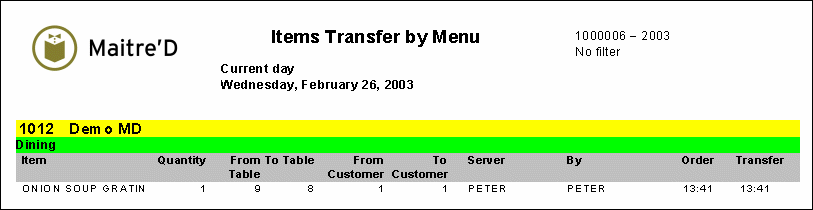
For each Revenue Center, this report provides you with:
Item:
Sales item description.
Quantity:
Amount of sales items transferred.
From Table:
Table number from where the sales item was transferred.
To table:
Table number where the sales items was transferred to.
From Customer:
Client number from where the sales item was transferred.
To Customer:
Client number where the sales items was transferred to.
Server:
Employee who had originally ordered the sales item on the wrong table and client.
By:
Employee who performed the item transfer.
Order:
Time when the sales item was originally ordered.
Transfer:
Time when the sales item was transferred to the new table and client.
Last updated
Was this helpful?